
How Much Does It Cost To Start A Blog?
One of the first questions people have when they start thinking about blogging is how much it’s actually going to cost.
And it’s a fair question.
Depending on which blogging articles you read, you might come away thinking you need hosting, a premium WordPress theme, an email marketing platform, expensive keyword research tools, stock photos, legal services, and about twelve other subscriptions before you can publish your first post. But, you really don’t!
Starting a blog is actually pretty inexpensive, which is why its a great hobby or side hustle.
Your biggest upfront expense is hosting, and your domain is usually included for the first year.
Most of the other tools you’ll eventually use either have free versions or can wait until your blog is further along.
In this post, I’m breaking down what it actually costs to start a blog, what I recommend paying for from the beginning, and which expenses you can save for later.
The short answer: You can start a blog for about $34 for your first year.
That covers your hosting and domain, and everything else can be added as you need it.
What You Actually Need to Pay For
There are really only two things you need to budget for when you start your blog: hosting and a domain.
And depending on the hosting company you choose, your domain may already be included.
Web Hosting
Web hosting is where your blog lives online.
It stores your WordPress site, blog posts, photos, and everything else that makes up your website.
This is the main expense I recommend budgeting for from the beginning.
I use and recommend DreamHost for all of my new blogs.
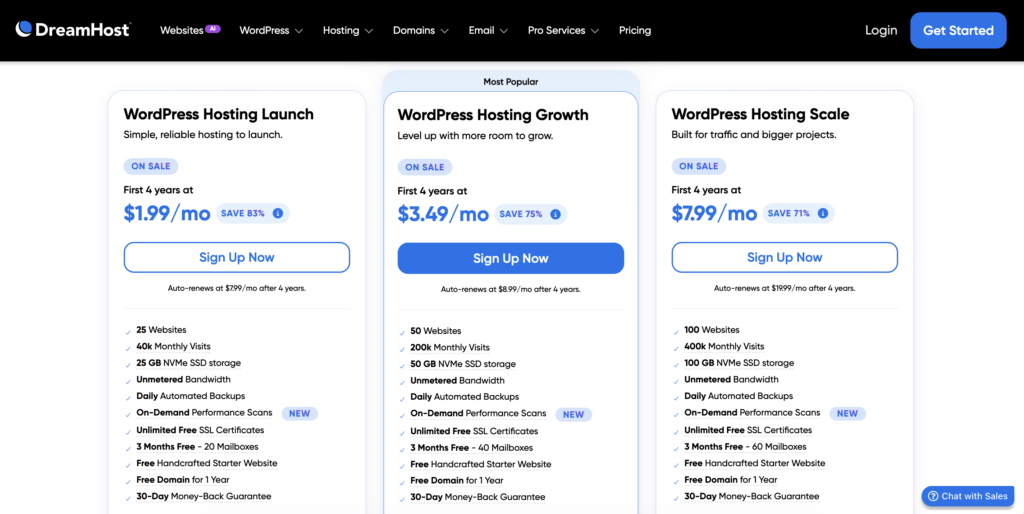
- Their Launch plan gives you a couple of options depending on how long and how much you want to pay upfront.
- You can choose the 1-year plan for about $34 for a year or the 4-year plan for about $97 for 4 years, which works out to roughly $24 per year.
- If you’re brand new to blogging and still figuring out if you want to stick with it, I’d probably start with the 1-year plan.
- You’re only committing about $34 in upfront costs, and you have a full year to build your blog and see where it goes.
If you already know blogging is something you want to work on long term, the 4-year option gives you the better price.
>> Grab either the Launch Plan or Growth Plan on DreamHost!
Domain Name
Your domain name is your blog’s address online.
For example, mine is BloggingAfterHours.com.
When you sign up for an annual DreamHost hosting plan, your domain registration is included free for the first year.
That means there isn’t an additional domain expense when you initially set up your blog.
After the first year, DreamHost currently renews domains for around $19.99 per year.
You can also transfer your domain to another registrar later if you want to lower the renewal cost of your domain.
I personally use Porkbun for several of my domains, and most of mine cost around $11 per year there.
But I wouldn’t worry about transferring anything when you’re first getting started and I always take advantage of the free domain deal with Dreamhost for the first year.
Getting your domain free through your hosting company keeps the initial setup a little easier, and you can always move it later (if you choose!). It also keeps your blogging expenses low for year one which is a plus!
Other Blog Expenses
Once your hosting and domain are covered, most of the other things you’ll see recommended for bloggers are optional and you can always add them later!
Don’t feel pressured to buy everything at once especially if you are trying to blog on a budget.
Some items are definitely useful.
I use plenty of them myself.
But they don’t all need to become expenses during your first week of blogging.
Legal Pages
Your blog should have a few basic legal pages if you plan to monetize your blog, including things like a privacy policy and disclaimer.
That doesn’t necessarily mean you need to pay for a legal service immediately.
You can start with free templates while you’re getting your blog set up.
As your blog grows, especially if you want to start earning money through affiliate links, sponsored content, digital products, or other income streams, I’d consider upgrading to a service that can help you keep those policies current and protect your blog legally.
I use Termageddon, which currently costs around $119 per year or $12 per month.
One of the reasons I like it is that your policies can automatically update when privacy laws change instead of you having to keep track of every change yourself.
That’s something I think becomes much more valuable once your blog is established and making money.
If you want to try Termageddon use coupon code “MONICA” to grab 10% off your first year
>> Termageddon
Premium Blog Design
I recommend building your blog with the Kadence WordPress theme.
Kadence has a free version, and it gives you more than enough to create a good-looking blog when you’re starting out.
You can always upgrade the design later.
If you decide you want something a little more customized without designing the entire site yourself, there are also designers that sell pre-made Kadence child themes and website templates.
A few that I love to use are:
These give you a more finished website design that you can customize with your own colors, fonts, photos, and content.
I’d consider this a future upgrade rather than a startup expense.
Get the blog running first.
You can make it prettier later, unless you have the budget for a theme now! All of these companies do run sales and there are starter themes I would look at first.
>> How to Install a WordPress Theme
Photos and Graphics
You also don’t need a paid stock photo subscription when you start blogging.
There are plenty of free images available through sites like Unsplash and Pixabay.
If you want to create your own blog graphics, Pinterest pins, or social media images, Canva also has a free version that works perfectly well when you’re starting out.
Depending on what you blog about, you may also end up taking most of your photos yourself.
That’s what I do for some of my content.
Paid stock photography can be a nice upgrade later, but it isn’t something I’d build into your initial blogging budget.
Email Marketing
Eventually, you’ll probably want to start building an email list.
An email list gives readers a way to stay connected with you outside of your blog and social media.
The good news is that most email marketing platforms have a free plan or inexpensive starting option.
So again, this doesn’t have to become a major expense right away.
You can start with a free plan while your list is small and upgrade once you actually have enough subscribers to need more features.
I’d rather see you reach the point where your free account is becoming limiting than pay for a larger plan for a list that doesn’t exist yet.
Blogging Tools
There are also dozens of other tools you’ll hear bloggers talk about. Things like:
- Keyword research tools.
- SEO tools.
- Social media schedulers.
- Pinterest tools.
- Design software.
- AI tools.
- Editorial calendars.
- Analytics platforms.
Some of these can save you a lot of time as your blog grows.
But nearly all of them either have a free option or aren’t something you need during the early stages of your blog.
You can always add paid tools once you know what would actually make your blogging workflow easier.
So, How Much Does It Cost to Start a Blog?
Let’s put everything together.
If You Choose the 1-Year DreamHost Plan
Your initial costs would look something like this:
- Web hosting: about $34 for your first year
- Domain: free for your first year
- WordPress: free
- Kadence theme: free
- Photos and graphics: free options available
- Email marketing: free options available
- Blogging plugins and tools: free options available
Total to start your blog: about $34.
After your first year, you’ll need to renew your hosting and domain.
Your domain currently renews for about $19.99 through DreamHost, or you can transfer it somewhere like Porkbun where many domains cost closer to $11 per year.
If You Choose the 4-Year DreamHost Plan
If you know you’re in this for a while, you can pay about $97 upfront for four years of hosting.
That works out to roughly $24 per year.
Your domain is still free for the first year, and you won’t have another hosting payment until the end of those four years.
Your only additional recurring website expense during that period would be your domain renewal, which is about $19.99 each year with DreamHost or $11 if you switch to Porkbun for your domain only.
As Your Blog Grows
Later, you might decide to invest in things like:
- A premium blog design
- Legal policies through a service like Termageddon
- Paid email marketing
- Keyword research or SEO tools
- Paid stock photos
- Social media scheduling tools
But those expenses should come from what your blog actually needs.
You don’t need to predict every tool you might eventually use before you’ve even published your first post.
Ready to Start Your Blog?
For about $34, you can have the hosting and domain you need to start building your blog.
That’s enough to install WordPress, design your site with a free theme, create your first pages, and start publishing.
Everything else can be added as your blog grows and you figure out which tools are actually worth paying for.
If you’re ready to get started, I’ll walk you through setting up your blog with DreamHost step by step next. Check out my post on How to Start a Blog With DreamHost!
Some links on this site are affiliate links, which means I may earn a small commission if you make a purchase through them, at no extra cost to you. I only recommend products and services I genuinely use, like, or think are worth sharing.